
© Felix Rome / Mara Predator Conservation Program


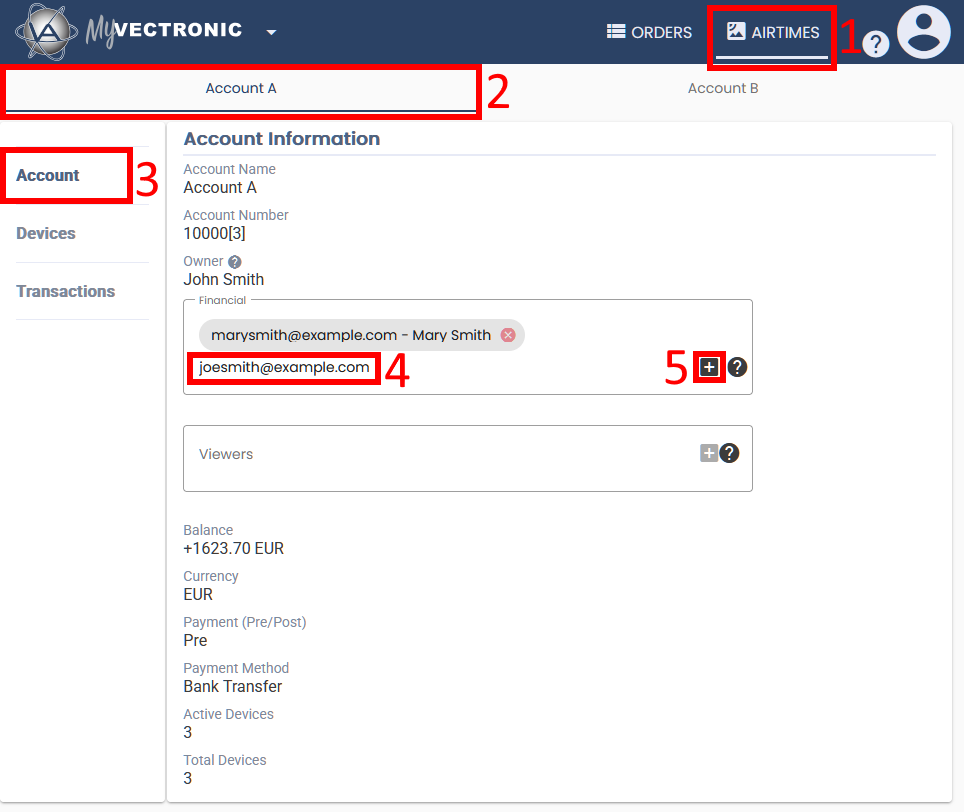
A MyVectronic Airtime Owner can add as many ‘Financials‘ and ‘Viewers‘ as required to share account administration responsibilities between different users.
Here are the necessary steps:
1.
Switch to the tab ‘AIRTIMES’
2.
Select an Airtime account if you have more than one
3.
Make sure the section ‘Account’ is selected
4.
Depending on your needs, select either the ‘Financial‘ or ‘Viewer‘ text box andEnter the email address of the MyVectronic user you want to grant access
5.
Then click the -icon
-icon
 -icon
-iconRoles and permissions overview
| Airtime Owner | Financial | Viewer | |
| Add Financials and Viewers | ✔ | ✘ | ✘ |
| View payment information and balance | ✔ | ✔ | ✔ |
| (De)activate device airtime | ✔ | ✘ | ✘ |
| View and export transactions | ✔ | ✔ | ✔ |
| Get notified about new invoices | ✔ | ✔ | ✘ |