
© Felix Rome / Mara Predator Conservation Program

INVENTA
INVENTA Desktop enables you to reconstruct fine-scale animal trajectories between GPS fixes by combining high-resolution accelerometer and magnetometer data.
Requirements
Before utilizing the Dead Reckoning feature, ensure the following conditions are met:
- Data Collection: Vertex Plus Iridium collar with the accelerometer turned on that has already collected Accelerometer data and Magnetometer data.
- Data Download: Accelerometer data and Magnetometer data need to be downloaded from the collar via local USB connection. See Download Data from a local device
- Data Import: Accelerometer data and Magnetometer data must be imported into the Motion tab. See How to Import and Export Motion Data.
- User Permissions: You must hold at least Data Manager permissions for the corresponding collar.
- Deployment (Optional but Recommended): A Collar to Animal Deployment should be created for the device.
How it works
Dead reckoning estimates a continuous movement path between known positions. In wildlife tracking, this technique bridges the gaps between standard GPS fixes by utilizing high-resolution collar sensors:
- Accelerometer data: Used to estimate movement speed.
- Magnetometer data: Used to estimate heading (direction).
Because path estimation accumulates drift over time, the software automatically corrects the calculated path by resetting the error at every known GPS position. A higher GPS fix rate resets the error more frequently, resulting in a more accurate path. Before results are generated a calibration is done.
Calibration is the process of fine-tuning the dead reckoning parameters for a specific tracking session. Optimal parameters vary depending on factors such as: Individual animal characteristics and species, gait patterns and terrain types, Seasonal conditions and specific sensor hardware.
Optimizing these variables during calibration generates a more accurate estimated path.
Performance Note: Calibration and refinement calculations require significant processing power and can take a long time. INVENTA Desktop may become less responsive during this process.
- Tip: Early results can already be viewed in the Results tab. You can safely stop the process at any time and continue it later.
Finding Dead Reckoning

- Navigate to the main tab Data.
- Select Dead Reckoning from the submenu. (Note: This option only appears if all requirements above are fulfilled).
Calibrating
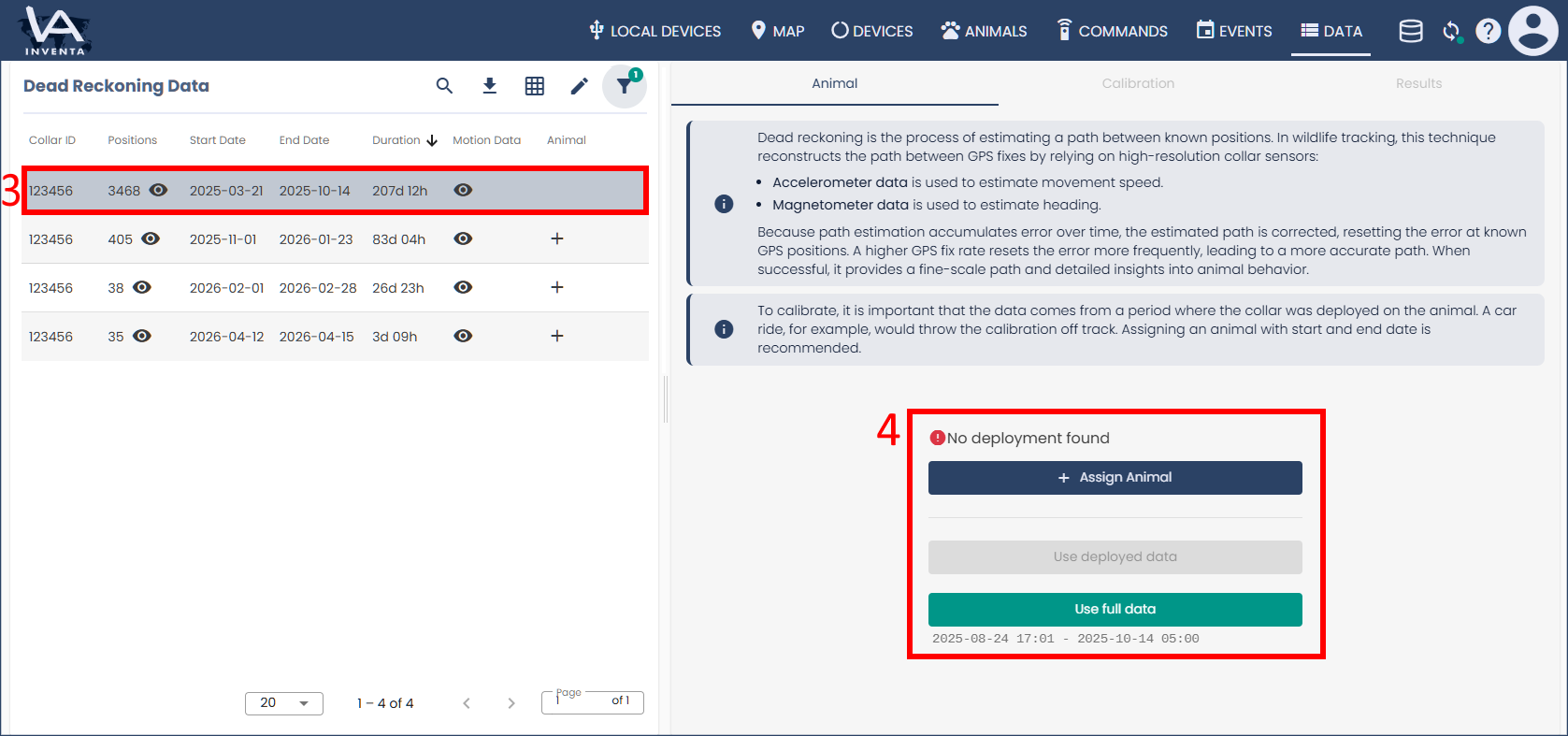
3. Click on the table row of a data set for which you want to start a calibration.
4. To achieve optimal results, apply the calibration only to the part of the data that was recorded while the collar was on the animal. To do this, create a Collar to Animal Deployment if you have not already.
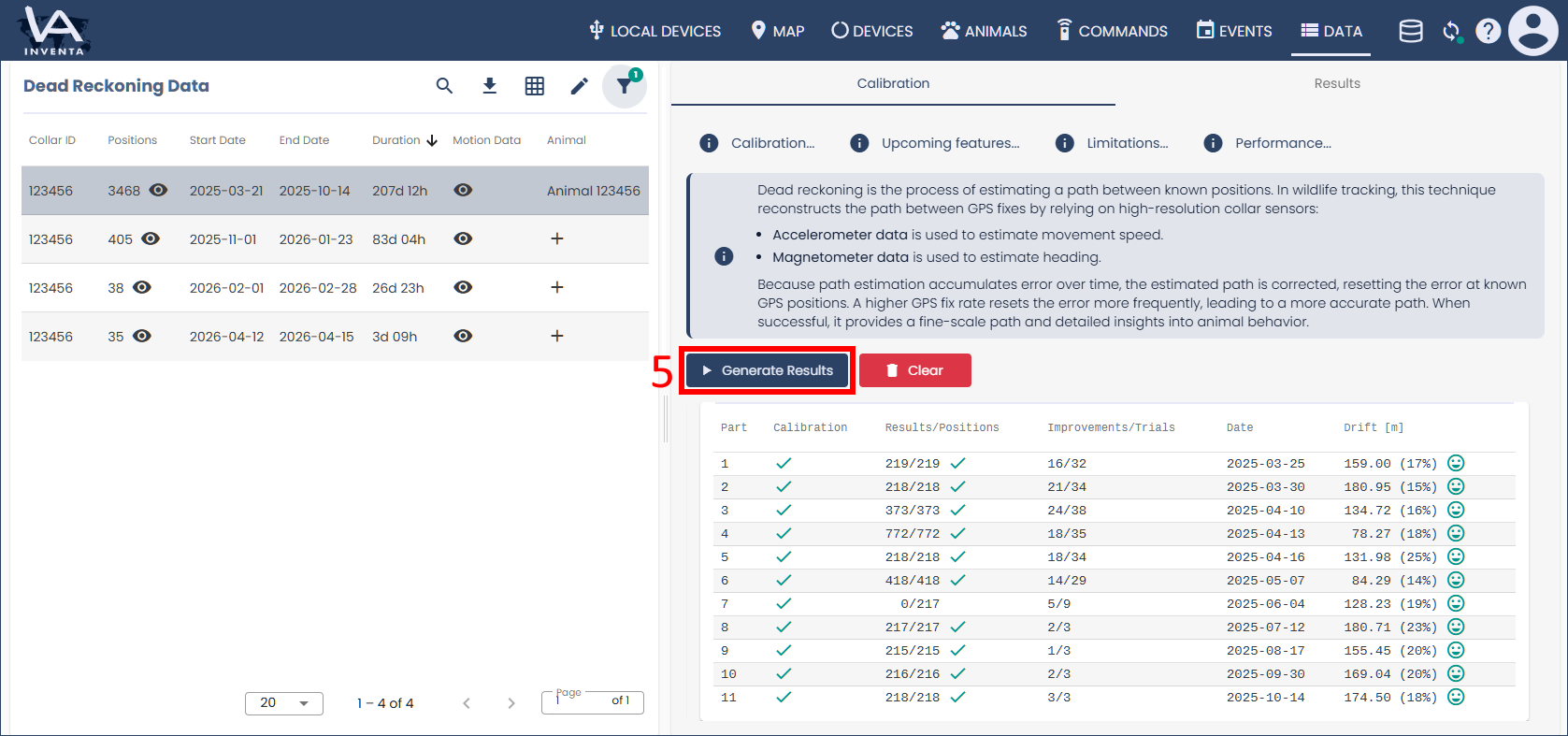
5. Then click the button “Calibrate” or “Generate Results” to start the calibration.
Calibration is done in 4-week splits. The progress is shown in a table and may take several hours. During calibration results are generated and regenerated when the calibration improves.
Map View and Evaluation
Once processed, the path is visualized on the map:
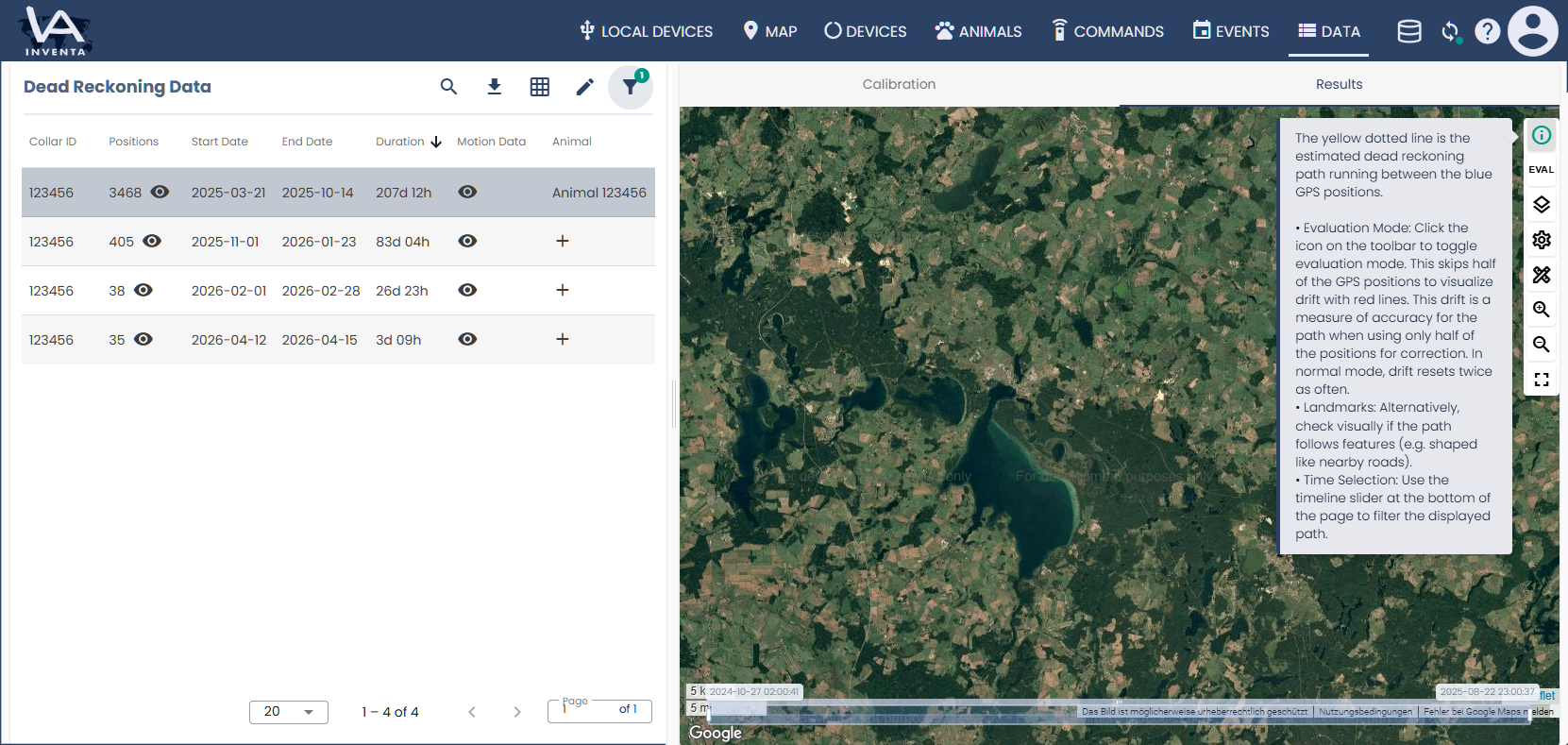
The results are visualized on the map:
- Blue points: Known GPS positions.
- Yellow dotted line: The estimated dead reckoning path running between the GPS fixes.
Verifying Accuracy
- Evaluation Mode: Click the Evaluation icon on the toolbar to toggle this mode. The system will intentionally skip half of the GPS positions to visualize uncorrected drift using red lines. In normal mode, drift resets twice as often.
- Landmarks: Visually check if the calculated path aligns with real-world features, such as following the shape of nearby roads or geographic structures.
- Time Selection: Use the timeline slider located at the bottom of the page to filter and view specific sections of the displayed path.
Limitations
Dead reckoning in INVENTA Desktop is currently an experimental feature tested on a limited set of data. Known sources of inaccuracies include:
- Short distances: Proper calibration requires sufficient movement. Animals with limited travel distances (e.g., in small pastures) may not calibrate effectively.
- Geomagnetic poles: Proximity to the Earth’s magnetic poles causes the magnetic field to point downwards, making heading determination difficult.
- Magnetic interference: Nearby metallic objects or local electromagnetic fields can distort sensor readings.
Upcoming Features
Future updates to INVENTA Desktop will introduce:
- Landmark positions: The ability to manually anchor paths to known landmark coordinates for enhanced correction.
- High-resolution data export: Export capabilities for speed, distance, tilt (roll/pitch), and advanced movement metrics (VEDBA).