
© Felix Rome / Mara Predator Conservation Program

INVENTA
Related Articles:
• Lifecycle of Remote Commands
Permissions:
To send remote commands, your INVENTA account must have Owner or Device Manager permissions. Other roles are read-only, allowing you to monitor command history but preventing you from sending them. Authorized accounts can Manage User Roles for others. To see what each role can do, check the Permission Overview.
Important to know:
When you send a remote command, it is not delivered instantly. Because the collar stays in energy-saving mode to conserve battery, the collar only checks for and downloads new commands during its next scheduled data transmission.
Initiating Remote Command configuration in the user interface
Begin creating the new remote command as follows:
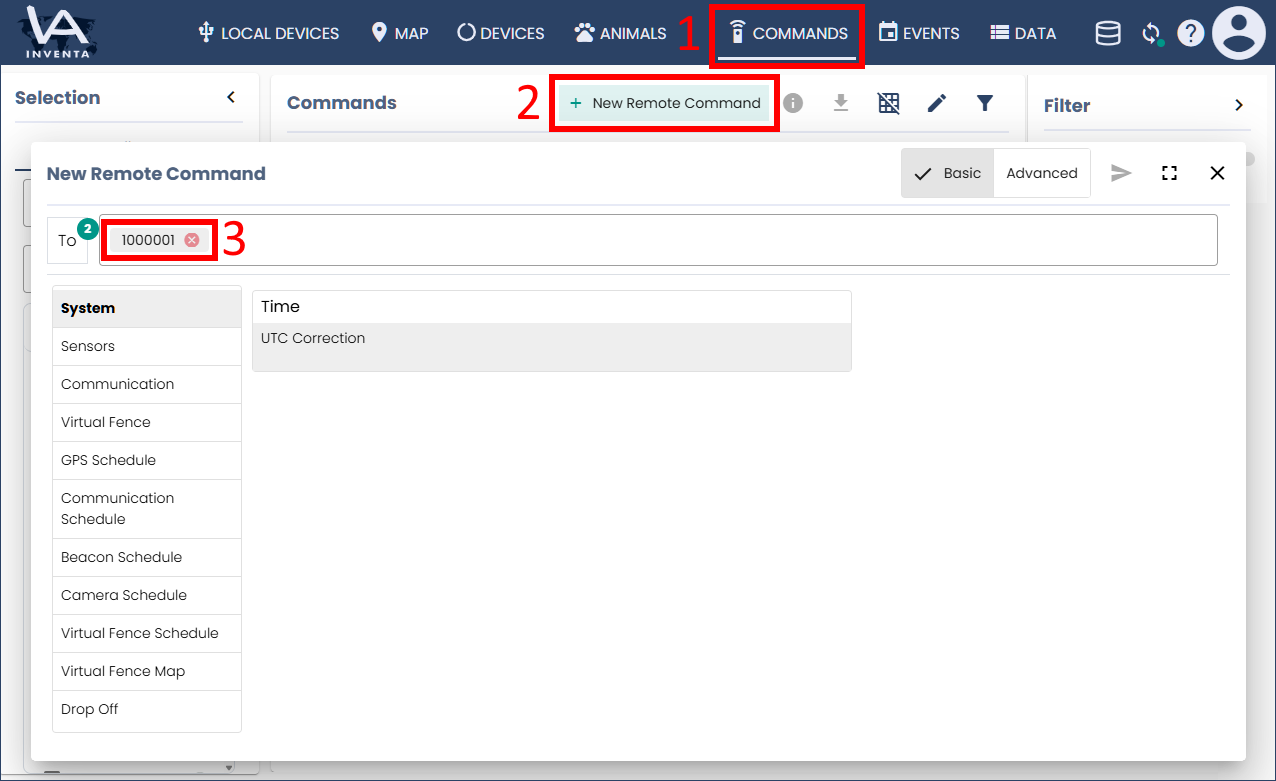
- Navigate to the ‘Commands’ page in the blue INVENTA header.
- Click the button ‘Remote Commands’.
- Enter your Collar ID(s) in the ‘To’ field.
Please choose the type of remote command you want to dispatch to find further specific instructions: