© Felix Rome / Mara Predator Conservation Program

INVENTA
Related Articles:
• Send Remote Commands
Permissions:
Your INVENTA account needs to hold Owner permissions or Device Manager permissions on the collar.
On the INVENTA Commands page, first click the ‘New Command’ button on the right side of the table header.
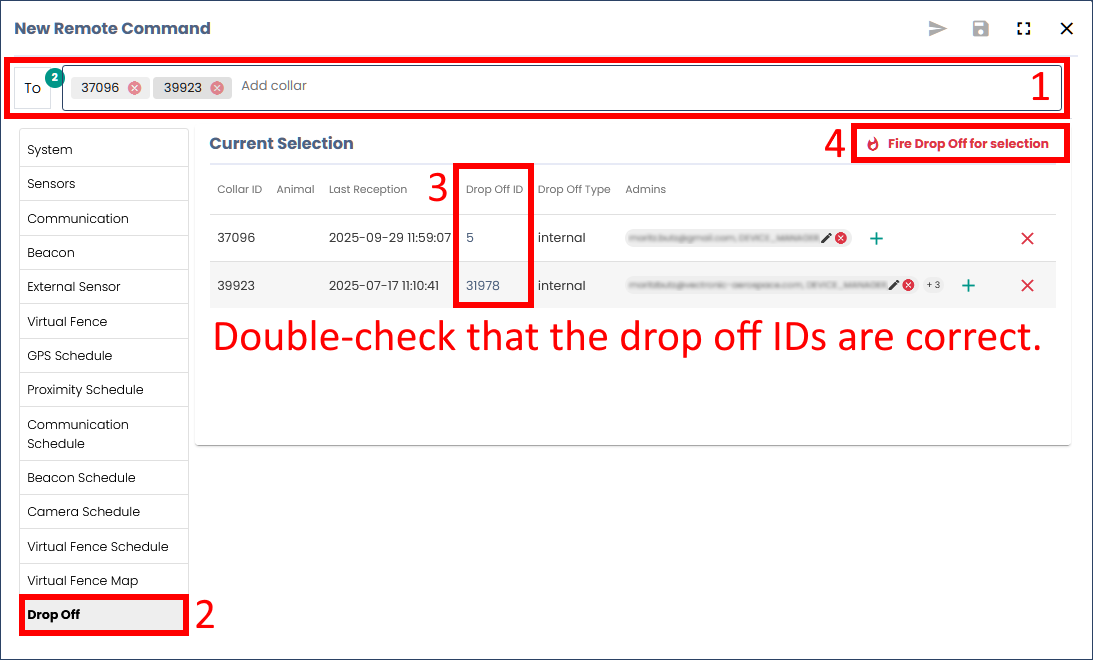
In the appearing ‘New Remote Command’ window, enter one or more collar IDs into the filter. The available Remote Command types for your collars will now be displayed.
Firing Drop Offs
IMPORTANT TO KNOW:
Drop Offs can only be fired once. Always keep in mind that this is irreversible.
Good to know:
- Drop Offs are not activated at the moment the command is sent. The command can only be executed when the collar sends data the next time and is then ready to receive the command.
- Double-check your Drop Off ID before firing. It is possible that the ID displayed is not up to date, e.g. if the Drop Off ID was not changed in Inventa after a battery replacement.
- If the command “Drop Off” is not available, then assign a Drop Off to this collar in Inventa.
- If the Drop Off activation has worked, you will receive the corresponding mortality messages after the mortality period has expired (provided that the collar has reception and can send data).
Drop Off firing triggers the mechanism located in the battery pack (internal Drop Off) or on the belt, causing the collar belt to open and detach from the animal. The selected collars are listed in the overview table. This allows you to check your selection once more before pressing the ‘Fire Drop Off for selection’ button.