
© Felix Rome / Mara Predator Conservation Program

INVENTA
Please note: Your INVENTA account must have at least data manager permissions for all the devices you want to migrate.
So first, all collars must be added to your INVENTA account as described in ‘Add a collar‘.
Export data from GPS Plus X (as CSV files)
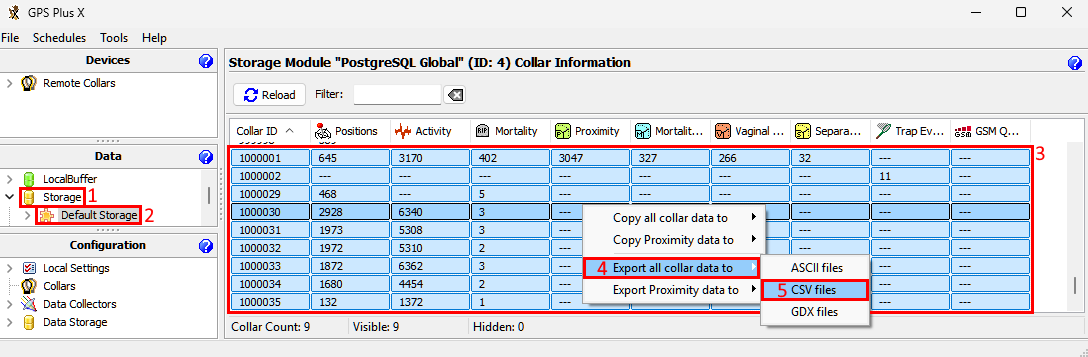
- go to GPS Plus X –> Data –> Storage –> [Name of your storage]
- select all collars whose data you want to export (ctrl + left click)
- click on one of the selected collars with the right mouse button
- select ‘Export all collar data to’ –> ‘CSV files’ from the context menu
- export the files to a directory of your choice
Import CSV files into INVENTA Desktop
Please note: The maximum amount of uploaded data to INVENTA per device is 500.000.
Overview: Which INVENTA Desktop page allows to import which CSV files:
|
INVENTA Desktop page |
GPS Plus X CSV file name starts with |
|
Data –> Activities Events page |
ACT… |
|
Data –> Position page |
GPS… |
|
Events –> Mortality Implant Events page |
MIT… |
|
Events –> Mortality Events page |
MOR… |
|
Events –> Proximity Events page |
PRX… |
|
Events –> Separation Events page |
SEP… |
|
Events –> Vaginal Implant Events page |
VIT… |
|
(Trap data upload not supported yet) |
TRP… |
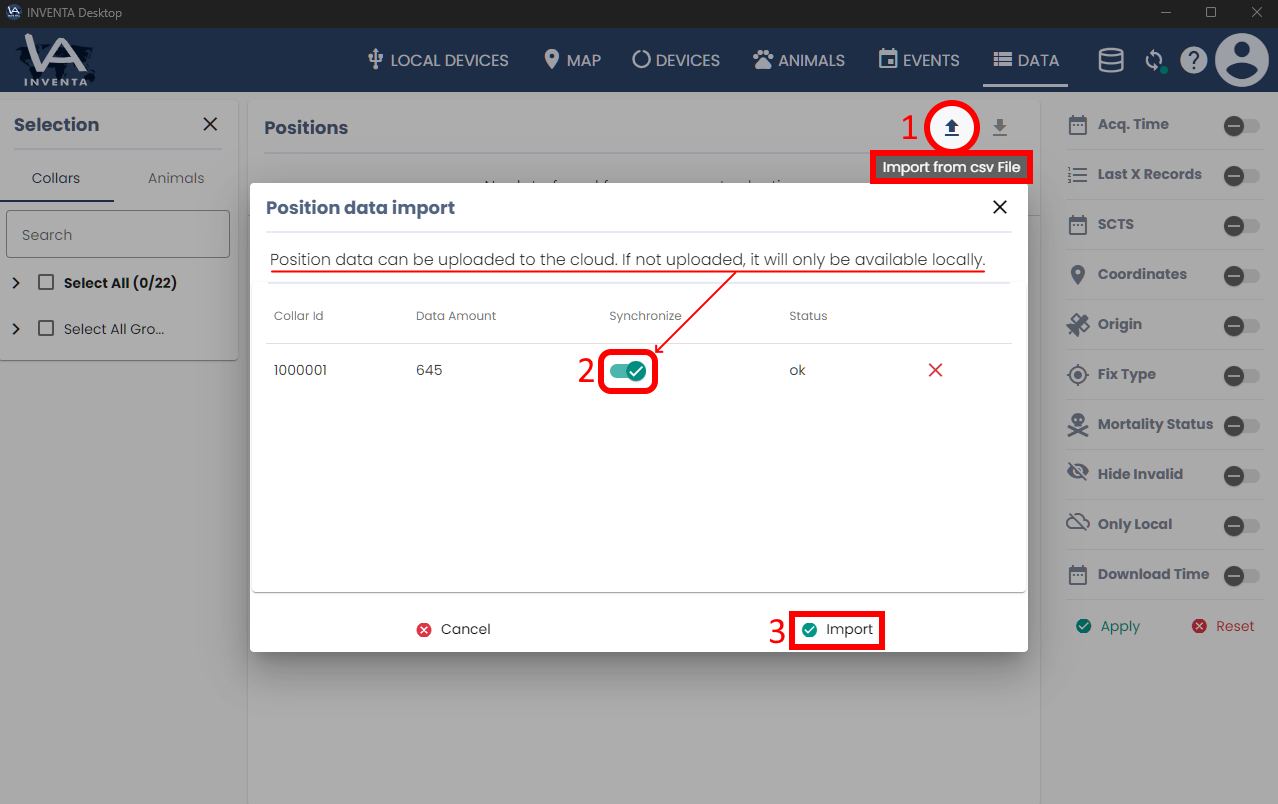
To upload the CSV files to INVENTA Desktop, please navigate to one of the INVENTA pages shown in the table and proceed as follows:
- click on the button ‘Import from csv File’ at the top right above the table
- decide if the data should be synchronized with the cloud
- click on the button ‘Import’
Good to know:
When is a data migration from GPS Plus X to INVENTA necessary or advisable?
All data that your GPS Plus X has received via satellite is already available in INVENTA. A manual data migration from GPS Plus X to INVENTA is only necessary if your GPS Plus X database contains data that you received through other methods, such as via SMS or by directly downloading the collars data to your PC.
What data can be transferred from GPS Plus X to INVENTA?
Almost all data can be copied to INVENTA. Specifically, this includes:
- Activity Events
- Position Data
- Mortality Implant Events
- Mortality Events
- Proximity Events
- Separation Events
- Vaginal Implant Events
What data cannot be transferred from GPS Plus X to INVENTA?
- INVENTA does not support the manual upload of trap events, as these are obtained via satellite anyway and are therefore always available in INVENTA.
- Animals, which represent time period filters in GPS Plus X, also exist in INVENTA, but migrating Animals is not possible. Each Animal must be manually recreated in INVENTA.
- There is an upload limit of 200,000 data records per collar. Satellite data will continue to be processed even if the upload limit has been reached.
How is data stored in INVENTA?
The data is preferably stored centrally at Vectronic. From there, any INVENTA user with the necessary permissions can access the data, whether through a personal INVENTA account or via the Vectronic API. When manually uploading data to INVENTA, the uploader can optionally switch a toggle that copies the uploaded data to the central Vectronic database. Furthermore, the uploaded data is also stored locally on the uploader’s PC in its own separate INVENTA database. This can be either a local SQLite database or a PostgreSQL database, which can be shared among multiple INVENTA users within the local network.