
© Felix Rome / Mara Predator Conservation Program

INVENTA
Please note: Your INVENTA account must have at least device manager permissions for the collar you want to configure.
If the collar is available and a local USB connection can be established, you should connect the collar to INVENTA Desktop and access its configuration as described in:
If your collar is already in the field, you can initiate a remote command as described in:
Enter the external sensor ID in the collar properties to complete the pairing
To pair the external sensor with the collar, whether via a local USB connection or a remote command, you just need to enter the external sensor ID in the corresponding properties field of the collar:
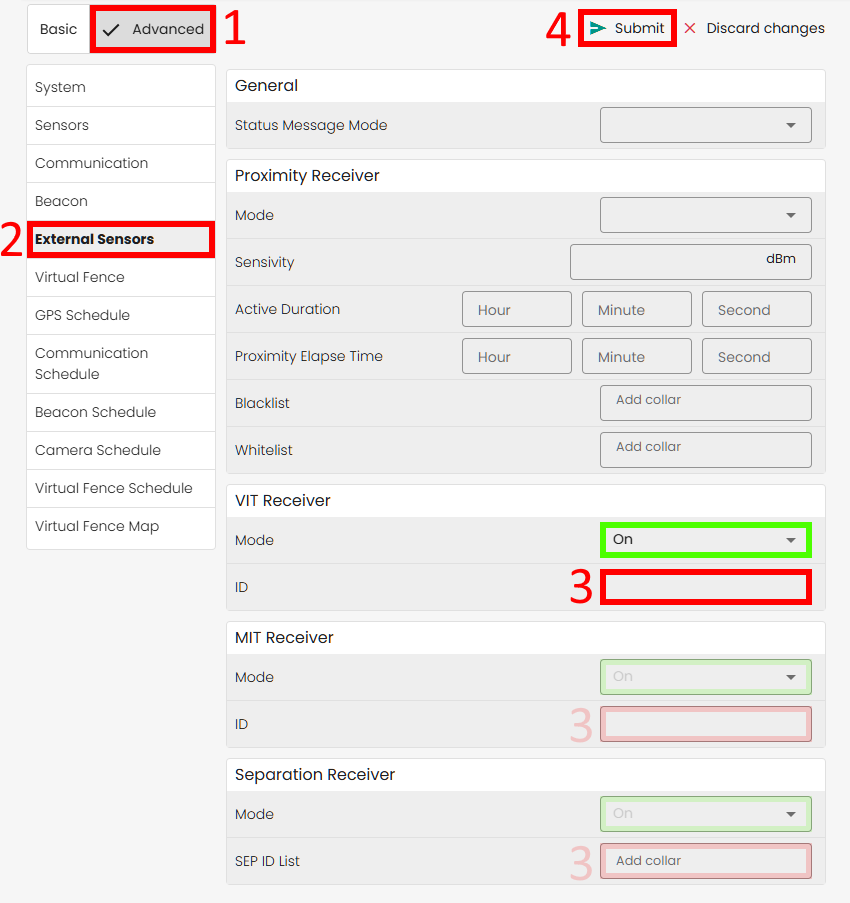
- Switch to Advanced mode
- Find the option ‘External Sensors’ in the left side menu
- Enter the ID of the external sensor in the corresponding field
3. Note: Please remember to set the field ‘Mode’ to “On” if necessary - Click the button ‘Submit’