
© Felix Rome / Mara Predator Conservation Program

INVENTA
Precondition:
• You need a Movebank account.
• You need at least Data Manager permisson in INVENTA for the device.
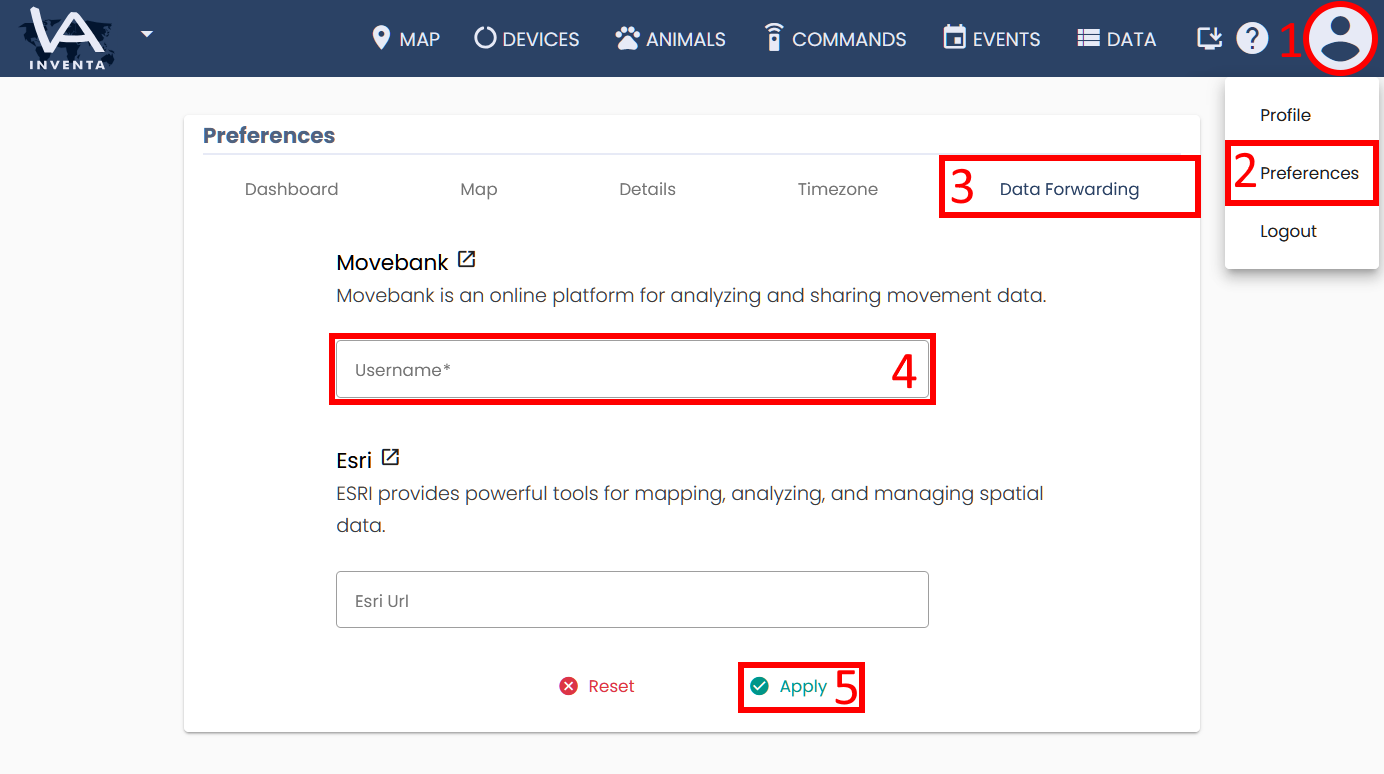
1. In INVENTA click on the user icon
2. Go to ‘Preferences‘
3. Select ‘Data Forwarding‘
4. Enter the name of your Movebank account
5. Click ‘Apply‘
6. Go to Collars page
7. Enable the column ‘Movebank’ by changing the column filter in the table header
8. Activate forwarding of new data by changing the ‘Auto forward data’ switch
-
- Upload all historical data for the devices via the ‘sync all data’ button (optional)

- To add the collar feed to your Movebank study, please follow the instructions from Movebank.